
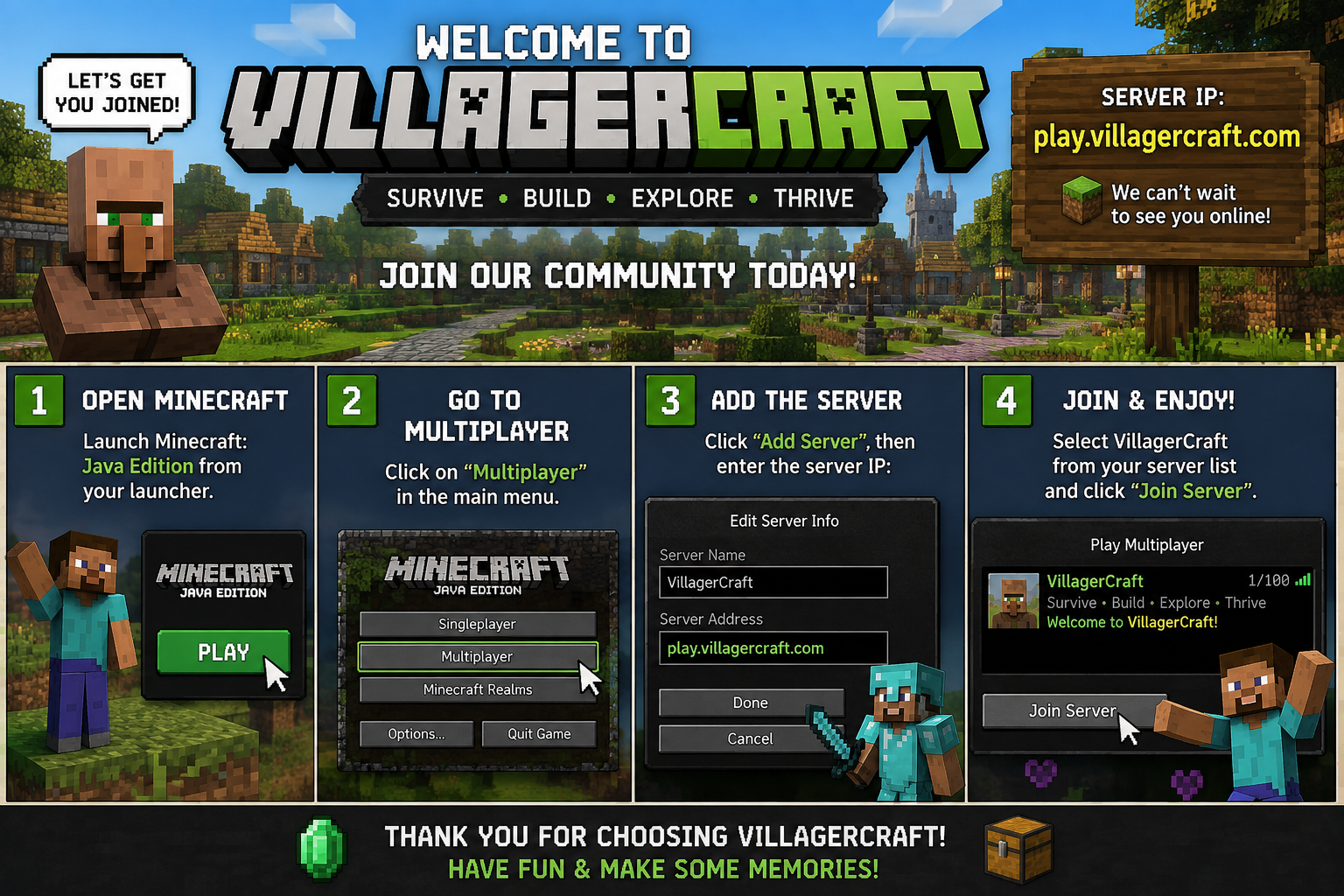
New here? You'll be in-game in under a minute. Just follow the steps below.
Works on Java Edition — here's exactly what to do
Click the button above (or copy it here): play.villagercraft.com
Launch the Minecraft Launcher and start any recent release version, then select Multiplayer from the main menu.
Click Add Server, name it whatever you like (e.g. "Villager Craft"), and paste the IP into the Server Address field.
Click Done, then double-click the new server entry in your list to connect.
Once you spawn in, use the hub menu/portals to choose Survival, Skyblock, OneBlock, Lifesteal or PvP.
Protect your builds right away with /claim, then check out /spawn, /warp and /kit to get oriented.
Playing on console, Bedrock, or mobile? Join through a service like Geyser using the same IP — ask in our Discord if you need a hand.
A few common speed bumps and how to clear them
Double-check the IP has no typos and that you're on the latest Minecraft release. Restart the launcher if it still fails.
Check the live status on our homepage — occasional restarts happen for updates and only last a couple of minutes.
Read the Server Rules, then head to spawn — signs and NPCs there will point you to each game mode.
Our team and community are active on Discord all day — open a support ticket there and someone will help you out.
Copy the IP, fire up Minecraft, and we'll see you in-game